


Cisco SD-WAN (formerly Viptela) is a leading SD-WAN solution used by many enterprise customers. Alkira supports Cisco SD-WAN integration powered by Viptela and Meraki and allows customers to use this feature to extend their SD-WAN to any public cloud by leveraging the Alkira CXP. This blog is going to be focused on the Cisco SD-WAN powered by Viptela.
Today SD-WAN connectivity to the cloud typically involves creating a transit VPC in a CSP environment, building connectivity to CSP transit networking construct, and connecting spoke VPCs.
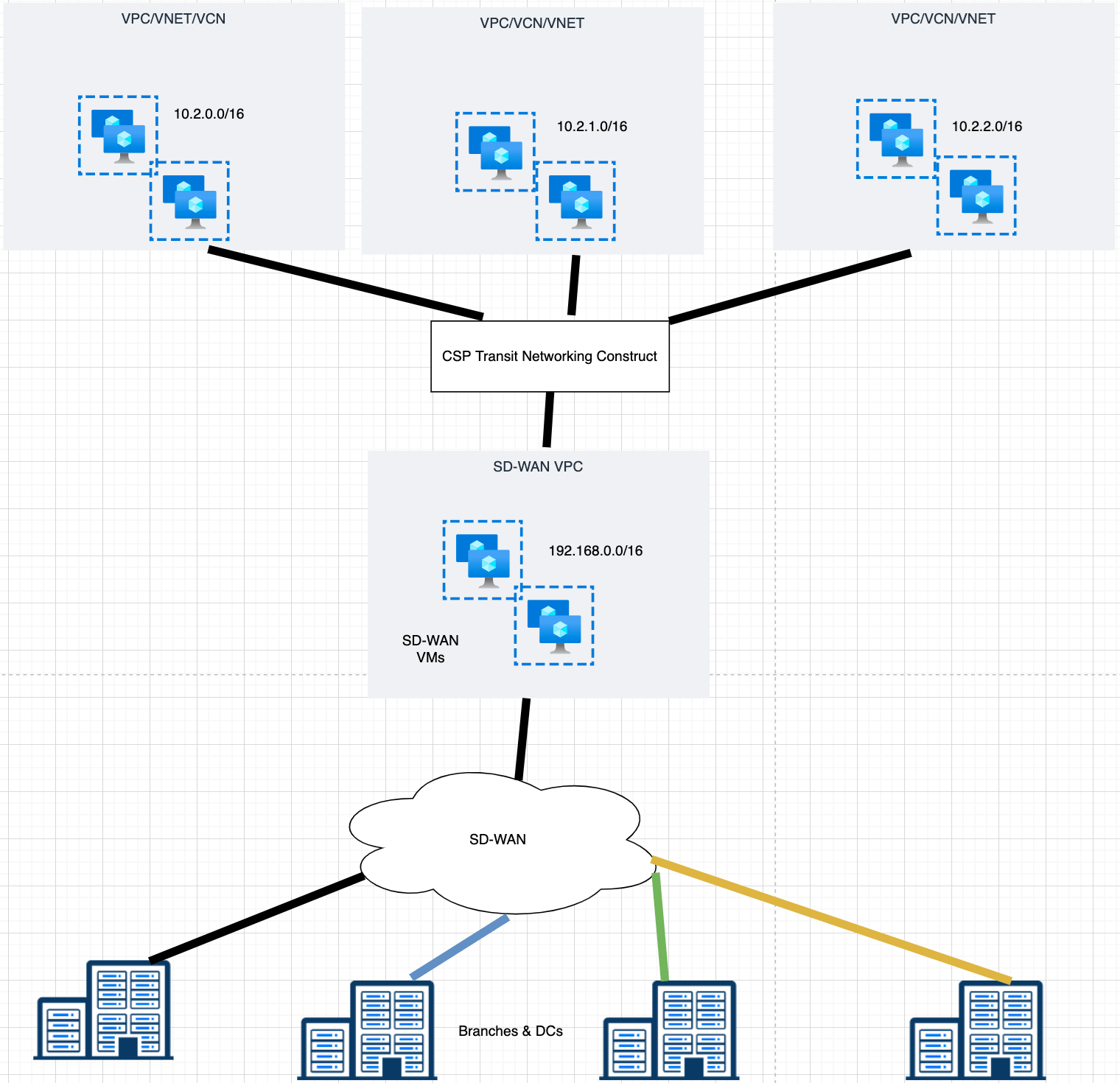
Figure 1: Native SD-WAN Connectivity to Cloud
Integration Details of Cisco SD-WAN
Alkira has designed the integration that seamlessly onboards Cisco SD-WAN virtual appliances inside the Alkira Cloud Exchange Point® (CXP) in just a few clicks. Once the virtual appliances are onboarded, Cisco SD-WAN is automatically extended to the public cloud environments attached to the Alkira Cloud Area Networking.
As part of the integration, Alkira completely automates the deployment, maintenance, and life cycle of the Cisco SD-WAN virtual appliances, yet allowing enterprises to maintain full administrative control through Cisco vManage, just like other physical and virtual CPE (customer-premises equipment) devices in their SD-WAN network.
The distributed nature of SD-WAN networks and the cloud workloads allows Cisco SD-WAN to peer with Alkira Cloud Area Networking in multiple geographically distributed locations. This is achieved by regionalizing the deployment of Cisco SD-WAN virtual appliances in multiple hub Alkira Cloud Exchange Points. Route exchange between the SD-WAN and the cloud network occurs at these hub locations. Enterprises can leverage Alkira intent-based traffic policy controls to influence routing information exchange between the two environments. Such controls allow optimizing the path between on-premises sites in the SD-WAN fabric and the workloads in the cloud network.
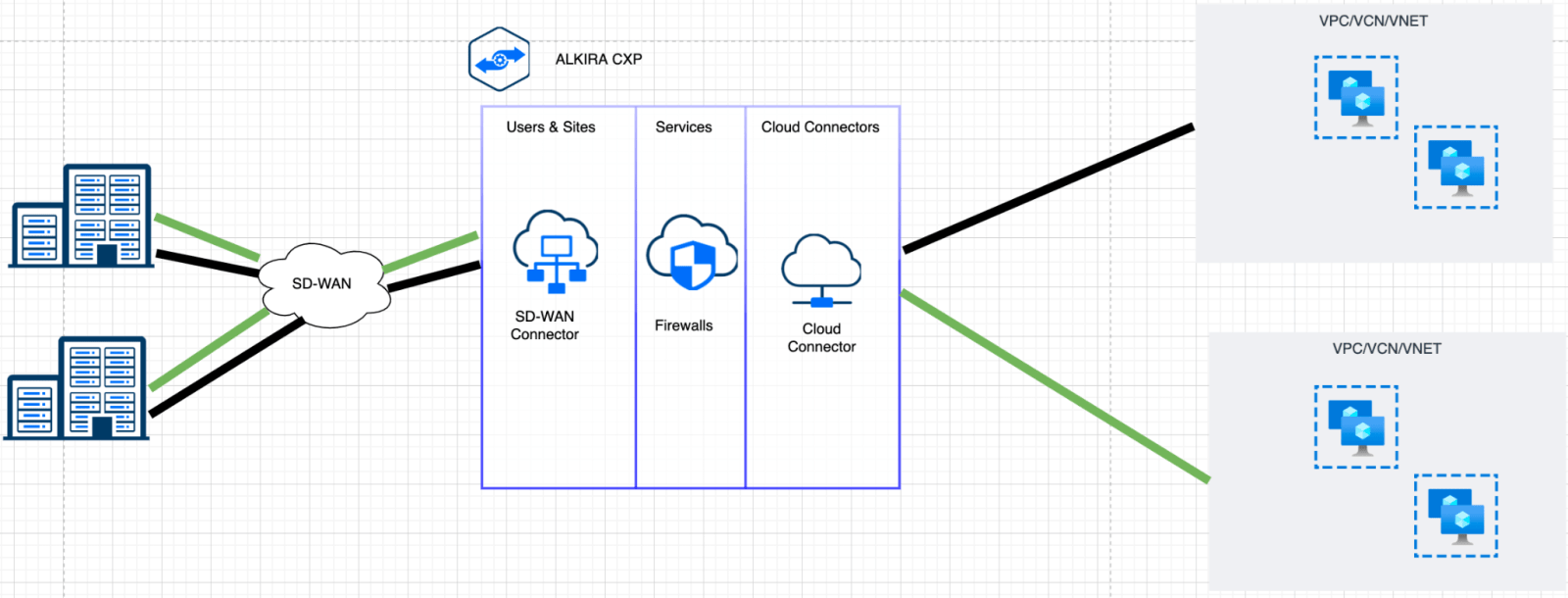
Figure 2: Alkira SD-WAN Connectivity
Cisco SD-WAN business-intent overlays offer effective traffic segmentation, seamlessly integrated with Alkira’s cloud network segmentation capabilities, effectively creating an end-to-end segmented environment across LAN, WAN, and cloud. Since the majority of security attacks originate from within the enterprise environment, rather than infiltrate through the external perimeter security, the joint end-to-end segmentation solution compartmentalizes resources and prevents lateral movement that minimizes the attack surface.
Configuration Details
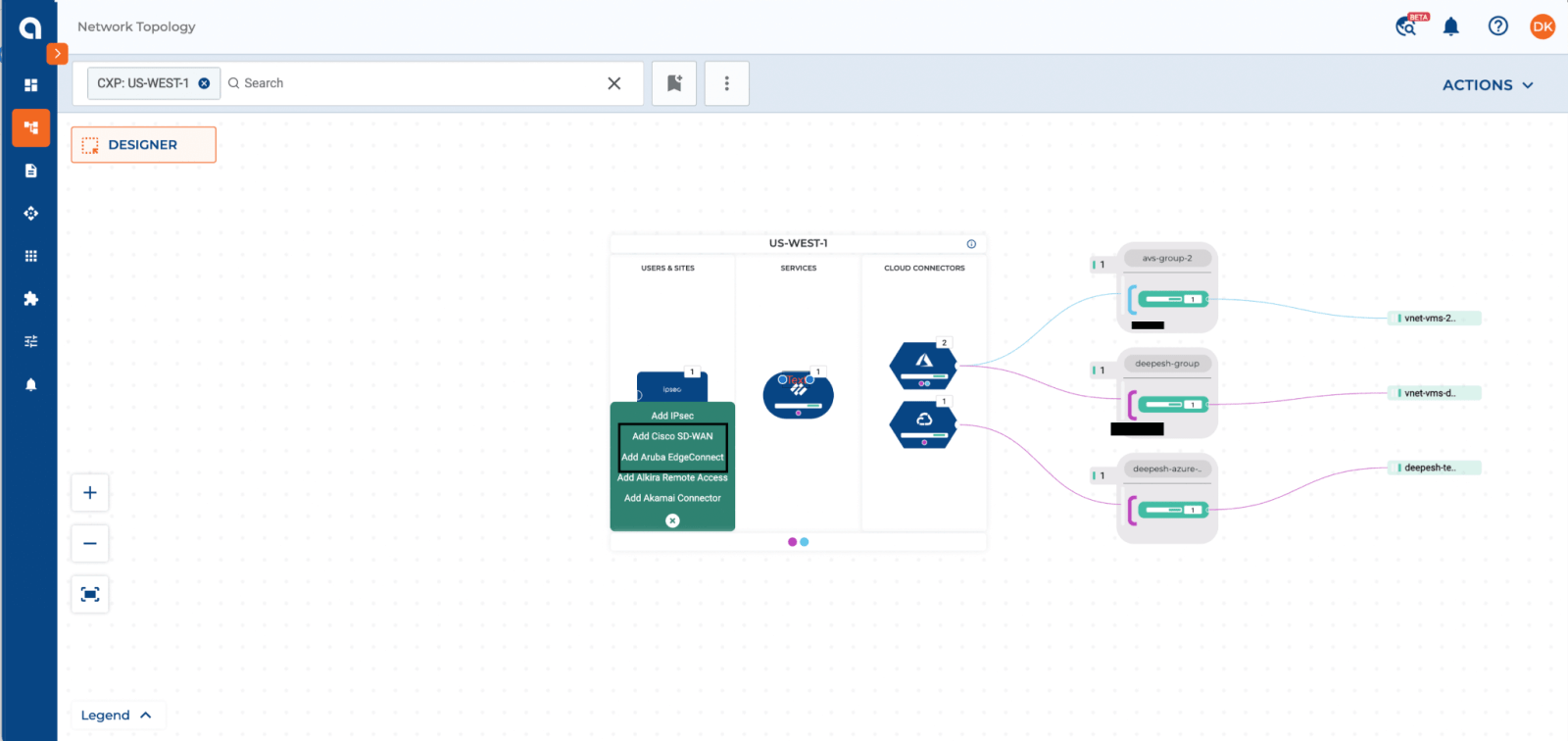
Figure 3: Adding SD-WAN Connector on Alkira CXP
As part of the configuration on the Alkira CXP, the user needs to select the Cisco SD-WAN connection and then fill in the information about the virtual SD-WAN device and then provision.
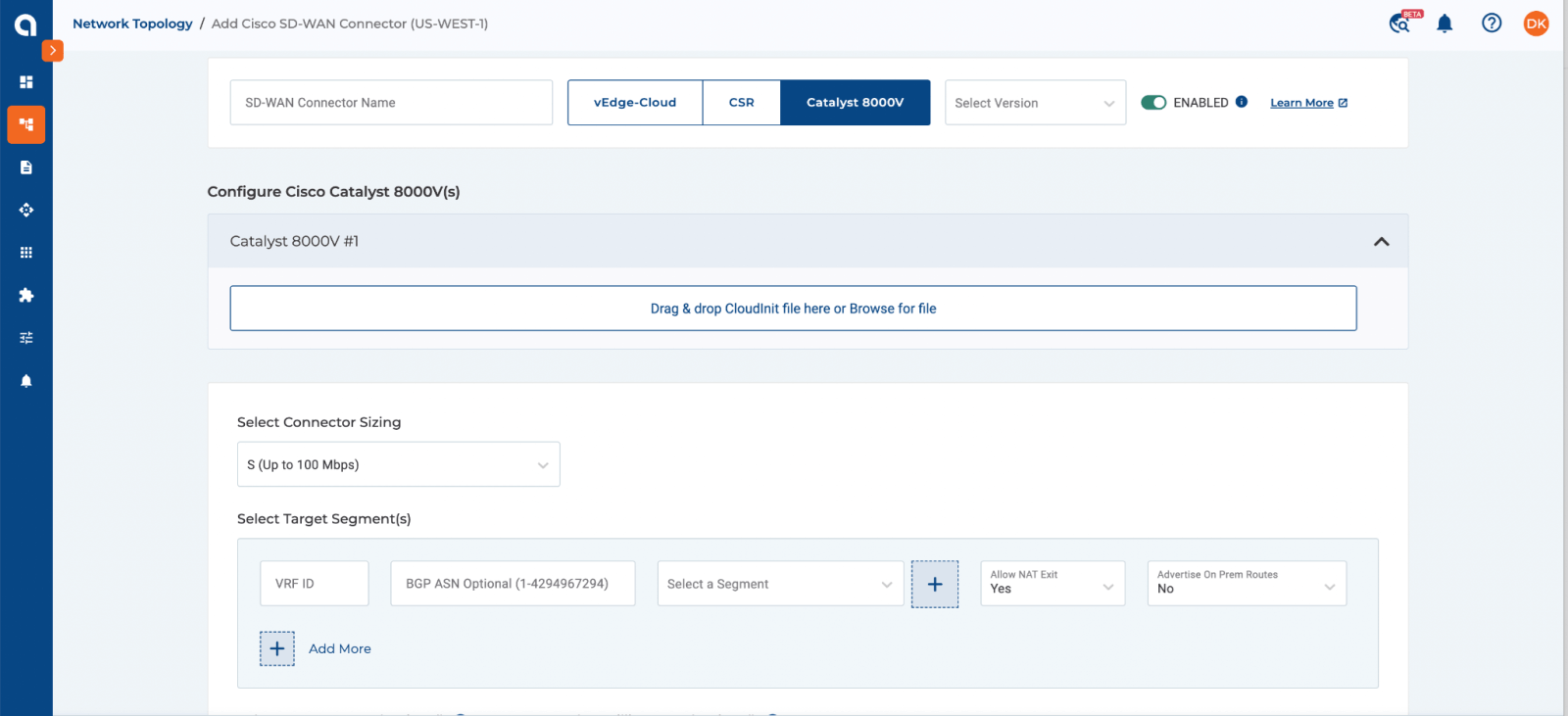
Figure 4: SD-WAN Configuration
The configuration includes adding the cloud init file which includes information about the SD-WAN VNF ids. The device could be on any supported software versions.
The user also needs to input information about the BGP ASN and VRF (VPN id) as well. As mentioned earlier the segmentation from the SD-WAN side can be extended by mapping the VRF to a segment. If communication to other on-prem connectors or internet access is required, those options can also be selected. Once all the required info is provided then the user can provision the SD-WAN connection.
NOTE: Alkira only supports BYOL license for Cisco SD-WAN powered by Viptela.
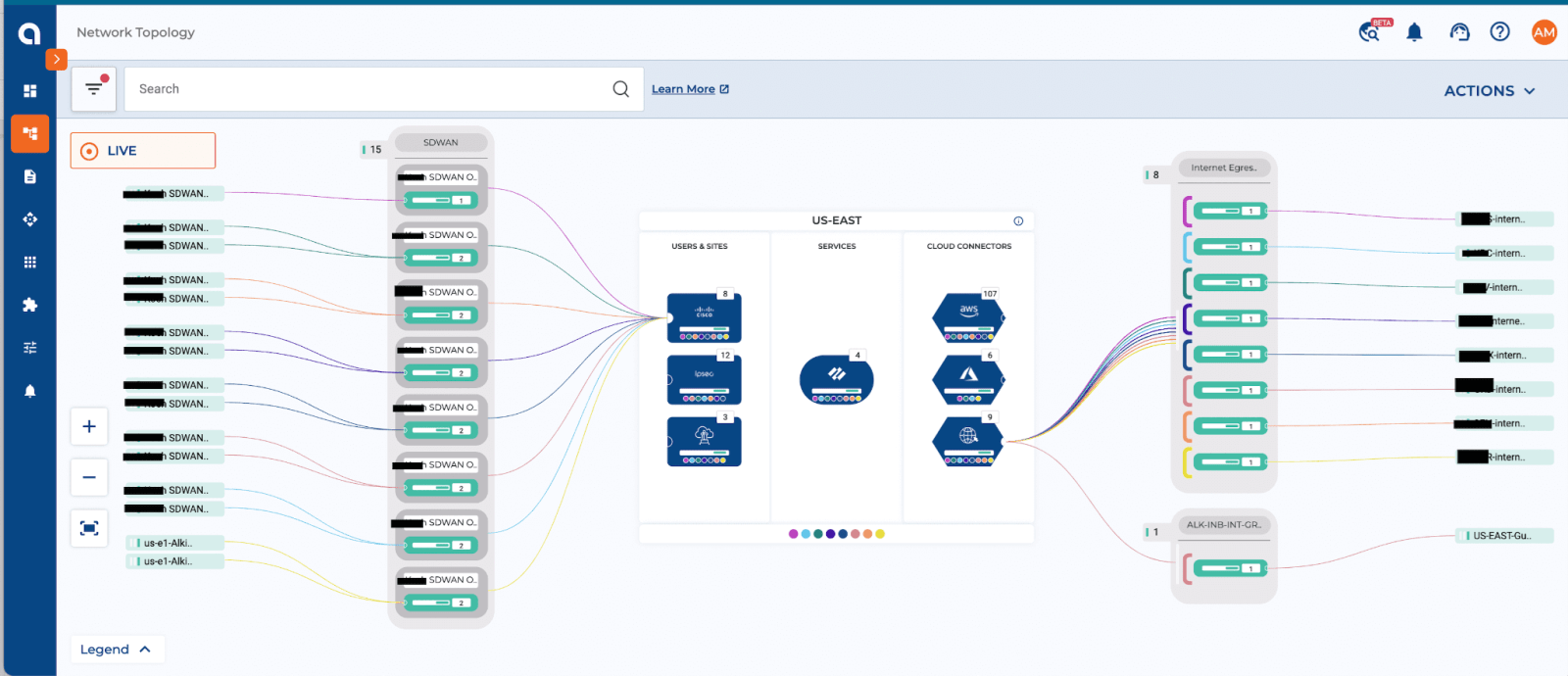
Figure 5: Provisioned SD-WAN connectors
Benefits of this Integration:
- Seamless Integration using APIs, which means provisioning and setting up the SD-WAN VNF is automated
- Extend Segmentation from the SD-WAN side towards the cloud side using the Alkira CXP which maintains the isolation of workloads
- End-to-end visibility of routes and traffic flows from the sd-wan to the cloud side
- Alkira’s intent-based policies allow quickly selecting cloud-bound application traffic of interest ingressing from the SD-WAN fabric to be forwarded to the firewalls for inspection